Saturday, 13 May 2023


Sunday, 16 August 2015
How to Run Ubuntu/Debian on any Android phone

LINUX DEPLOY
Linux Deploy is an open source app for easy and quick installation of GNU or Linux based OS on your android phone device.


This app is available in languages i.e. English and Russian,German, Italian, Spanish and Chinese.This app is with no warranty and anyone can use it free of cost or redistribute.
IMP:Your android device must be rooted before you use this app.

IMP:Your android device must be rooted before you use this app.

For More information and support please go through these links:
Instructions and guides: https://github.com/meefik/linuxdeploy/wiki
Ask questions on the forum: http://4pda.ru/forum/index.php?showtopic=378043
Ask questions on the forum: http://4pda.ru/forum/index.php?showtopic=378043
The work that this does is that it firstly download image of the particular linux you want to install and then install that in the root directory.The installation process tkes approximately 30 min depending upon the device you are using.
the minimum size that is recommended when you are using this app is 1024mb.

About App ::
This app requires android V2.1 and upper than this.
This app is of 7.3 mb.
Supported distributions: Debian, Ubuntu, Arch Linux, Fedora, openSUSE, Kali Linux, Gentoo, RootFS
This app requires android V2.1 and upper than this.
This app is of 7.3 mb.
Supported distributions: Debian, Ubuntu, Arch Linux, Fedora, openSUSE, Kali Linux, Gentoo, RootFS
Permissions this app wants:
Media:
1 modify or delete the contents of your USB storage
2 read the contents of your USB storage
Other:
1 full network access
2 run at startup
3 prevent device from sleeping
Media:
1 modify or delete the contents of your USB storage
2 read the contents of your USB storage
Other:
1 full network access
2 run at startup
3 prevent device from sleeping
For downloading this app clich here : Linux Deploy
Friday, 24 April 2015
Android Is Peeing On An Apple In Pakistan
Android Is Peeing On An Apple In Pakistan(Rawalpindi)

Today Everyone can see Android Is Peeing On An Apple In Pakistan near "RAWALPINDI".
The urinating droid image doesn’t appear in satellite view. Right now, the image can be seen on mobile devices too.


This could be been by someone as this type of thing was also seen inside the White house some day ago.
Google is just working on it. Just have a look your self asap before it gets invisible....=D
Click here to check it..
Tuesday, 21 April 2015
Calculate your aggregate percentage of B.Tech. according to GBTU Norms
Calculate your aggregate percentage of B.Tech. according to GBTU norms.

Calculate your aggregate %age of B.Tech. till third year according to GBTU norms.
Calculate your aggregate %age of B.Tech. till final year according to GBTU norms.
Sunday, 22 March 2015
Engineering Notes
STUDY MATERIAL

Study Note or material play a important role in every students life so here are some engineering subject notes for you all...
Notes for subject like DAA ,sensor and instrumentation,Digital logic design,Graph theory,Java,Operating system, Economics, Computer graphics you can find here.
Click Here for downloading notes.....
Saturday, 21 February 2015
Digital Locker

Now you do not have to hang out with her with the necessary documents. The government has launched a digital locker. Where birth certificates, passports, important documents, such as academic certificates online store. Just to get this feature you must have the base card. Based on the number of feeds you can open the Digital Locker account.
The special thing is that once the facility locker after uploading your documents anywhere you would not need to pay the original copy of your certificate. It would be enough to link to your digital locker. Digital Locker, Prime Minister Narendra Modi is an integral part of the Digital India program. Department of Electronics and Information Technology (Diiaitiwai) on Tuesday launched a beta version of the digital locker.
How will Digital Locker
Http://digitallocker.gov.in/ website you go to open the digital locker to create your ID. Id make you need to login to your base card number. After login you will be asked which Informensn complete it. Then, your account will become. After opening the account, you will be able to upload any documents on your personal.
What is the USP
This is typical of digital locker anywhere and anytime you can collect your documents through it. Digital locker scheme every Indian Educational, medical, passport and PAN card details have to be put in digital form. The website said, "digital locker authorized users / agencies at any time and anywhere to upload and share your documents securely Deng odds!
Saturday, 10 January 2015
Facebook Shortcuts.....!!!!
Shortcuts for operating Facebook

In today time everyone want shortcuts whether while operating system ,or while studying,solving any problem and many more.
so today you'll get to know some shortcuts that you can use while accessing your Facebook account.
so today you'll get to know some shortcuts that you can use while accessing your Facebook account.
Keyboard Shortcut
You can press these buttons on your keyboard to use Facebook
faster.
j , k - Scroll between News Feed stories
p - Post a new status
1 - Like or unlike the selected story
c - Comment on the selected story
s - Share the selected story
o - Open attachment of the selected story
enter - See More of the selected story
/ - Search
q - Search chat contacts
? - Show this help dialog
Ctrl + Alt + 0 - Help
Ctrl + Alt + 1 - Home
Ctrl + Alt + 2 - Timeline
Ctrl + Alt + 3 - Friends
Ctrl + Alt + 4 - lnbox
Ctrl + Alt + 5 - Notifications
Ctrl + Alt + 6 - Settings
Ctrl + All: + 7 - Activity Log
Ctrl + Alt + 8 - About
Ctrl + Alt + 9 - Terms
Ctrl + Alt + m - New Message

Thursday, 4 December 2014
Google Inbox invites
Google is giving out Inbox invites for the next two hour.
1. Compose an email from a Gmail address.
2. Send it to inbox@google.com.
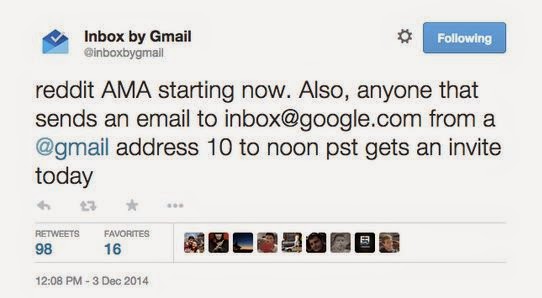
It’s worth noting we’ve seen a flood of emails actually break the Inbox invite system in the past: Users could ask for invites, only to be sent a rejection email shortly after. On the bright side, we don’t think that will happen again, as Inbox has been around for quite some time now and so there’s likely much less dema
after sending email you will get email like this....

for more info. https://support.google.com/inbox/answer/6067582?hl=en
Friday, 19 September 2014
Datawind to Launch Android Phone With Free Lifetime Internet
DataWind To Launch Cheapest Smartphone
 |
Soon Datawind is bringing the cheapest smartphone in India with the best facility ever any phone had i.e. FREE LIFETIME INTERNET ACCESS facility.
With this product the DATAWIND will be aiming to double its' volume in INDIAN MARKET.Low-cost mobile devices maker i.e. the datawind on fridat said that they will soon launch a smartphone before Diwali with aim to sell about 40,000-50,000 devices every month.
The cost of this smartphone is decide to be Rs.2,500 (approx.)only.

the company said that this Android based device will be having a screen of 3.5 inch display.
Datawind Executive Vice President Rupinder Singh stated that "the company is in talks with three mobile operators for the lifetime free Internet offer but refused to divulge more details as the deal is yet to be finalised."
He also stated that "We are looking forward to launch our Rs. 2,000 smartphone and few other devices before Diwali and intent is to double our sales by the end of this calender year."
It will be a tough competition among various companies like Spice,Micromax,Karbonn and many other who also launched their smart phones featuring the Firefox Os within the same price bound.
Thursday, 18 September 2014
Android One-:The battle
The Smartest One: Android one

Android One Features
- Always the latest version of android for 2 years.
- Hardware designed so one can play,watch and work faster.
- Google maps,Youtube and Google play,all built-in.
Many companies has launched it including Micromax, Spice, Karbonn etc.
Micromax has launched Android one with Canvas A1.
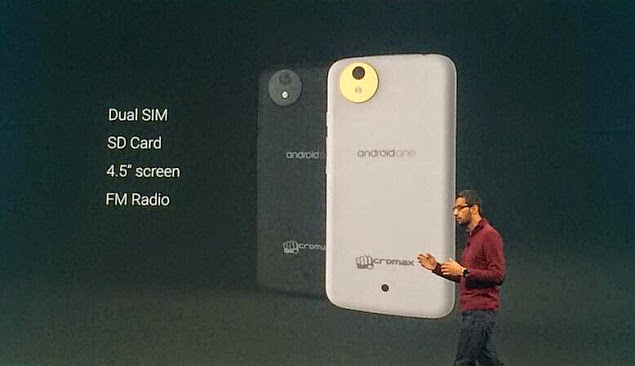
Micromax canvas A1 features
- Android Kitkat 4.4.4.
- 1.3 GHz quad core Processor.
- 11.43 cms IPS screen.
- 5mp Rear and 2mp Front camera.
Some Attractive Features
- Amazon: over 1.7 crore products to choose from.
- Youtube: watch video and keep commenting anytime,anywhere.
- Social networking: Facebook,twitter preloaded app.
- Messaging: apps like whatsapp,Wechat,line.
- Gmail: free storage upto 15 GB
Introductory prices: Rs 6,499/- with 8GB memory card free.
The first of the Android One devices is here. And we have been lucky enough to get our hands on the Micromax Canvas A1, one of the three smartphones launched by Indian manufacturers on the new Google platform. Here is what we thought of the new phone.
Amazon
Market:
Snap DealAmazon
Design: As far as looks go, the A1 looks like a lot of other Micromax phones in the same price bracket. The big difference is the detailing around the camera, a brushed metal right that looks quite classy. There is an Android One logo towards the lower end of the rear flap, and I guess we will have to get used to seeing this on more devices in the near future. The phone is slim in a sturdy sort of way and feels a bit heavy in your hands. It is thinner than the new Moto G for instance and that is a good place to be.Another interesting feature is the rear speaker grille, which is something I have not encountered recently.
Display: I was a bit put off when I heard FWVGA when this phone’s screen specifications were being announced. But the 854 x 480p IPS display is anything but disappointing, especially at this price. The colours are vibrant and the icons sharp. Reading is not at all an issue. The screen sort of blends into the black bezel at the top and bottom and this seems like a good way to hide the hard edges that dominate many screens of affordable smartphones. The screen has good viewing angles and it is not such a problem sing it in the sun.


Performance: This is what the Android One phones will be all about. There is no doubt that the hardware and software are great. So there is not even a semblance of a hesitation when you flip through the homescreen, open new apps or switch from one to another. This feels good.
Software: The OS is the purest form of Android. So there is nothing new for users who know their way around Android. All the Google apps come pre-loaded and you will enjoy using Google Now and maps on this phone. I have never seen maps load so fast. Voice recognition also worked really well.
Sources: Financial Express
Sources: Financial Express
Saturday, 6 September 2014
How to run .exe file in linux
.exe file in linux

we generally can't execute a windows executable(.exe formate file) on Linux.
but it is now possible to run .exe file in any of the the linux through a software called WINE.
wine is a compatibility layer capable of running Windows applications on several POSIX-compliant operating systems, such as Linux, Mac OSX, & BSD. Instead of simulating internal Windows logic like a virtual machine or emulator, Wine translates Windows API calls into POSIX calls on-the-fly, eliminating the performance and memory penalties of other methods and allowing you to cleanly integrate Windows applications into your desktop.
Click here for more information.

For running .exe file in linux perform two simple steps:-
1. open linux command prompt and enter the commands one by one
a) sudo apt-get update
b) sudo apt-get install wine1.7.26
(Here 1.7.26 is the version of the WINE you want to download.)
2. After installing the wine just Right click on the file you want to open let suppose my.exe and open it with Wine.
and enjoy...!!!!
Also you can install wine through Ubuntu software center and install thru GUI based process.
Download wine from here.
but it is now possible to run .exe file in any of the the linux through a software called WINE.
wine is a compatibility layer capable of running Windows applications on several POSIX-compliant operating systems, such as Linux, Mac OSX, & BSD. Instead of simulating internal Windows logic like a virtual machine or emulator, Wine translates Windows API calls into POSIX calls on-the-fly, eliminating the performance and memory penalties of other methods and allowing you to cleanly integrate Windows applications into your desktop.
Click here for more information.

For running .exe file in linux perform two simple steps:-
1. open linux command prompt and enter the commands one by one
a) sudo apt-get update
b) sudo apt-get install wine1.7.26
(Here 1.7.26 is the version of the WINE you want to download.)
2. After installing the wine just Right click on the file you want to open let suppose my.exe and open it with Wine.
and enjoy...!!!!
Also you can install wine through Ubuntu software center and install thru GUI based process.
Download wine from here.
Wednesday, 3 September 2014
Intugine technologies
A Product That Might Just Be The Next Big Thing In Tech

Intugine (Intugine Technologies Private Limited) is an Indian startup founded by students of Indian Institute of Technology Kharagpur in 2013. The founder, Harshit Shrivastava along with Vivek Kumar and Abhishek Sharma dropped out of IIT Kharagpur to work on a line of next generation products.
A few 3rd year IIT students dropped out of college to pursue their entrepreneurial dreams. They started Intugine technologies and now they are out with their first product, Nimble.
Nimble is a highly sensitive gesture control ring that allows users to interact, hands free, with almost all entertainment and communication technologies. Watch this slick video to find out what it is all about.
click here for more information
Monday, 1 September 2014
How to Write a Batch File
How to Write a Batch File

A batch file contains a series of DOS commands, and is commonly written to automate frequently performed tasks.A batch file may contain any command the interpreter accepts interactively at the command prompt. A batch file may also have constructs (IF, GOTO, Labels, CALL, etc.) that enable conditional branching and looping within the batch file.
.bat: The first filename extension used by Microsoft for batch files. This extension runs with MS-DOS and all versions of Windows, under COMMAND.COM or cmd.exe, despite the different ways the two command interpreters execute batch files.
Writing a batch file is easier than it looks; the difficult part is making sure that everything happens in the right order. Well-made batch files can save you a lot of time over the long run, especially if you deal in repetitive tasks.
Batch files run a series of DOS commands, so the commands that you can use are similar to DOS commands. Some of the more important ones include:
ECHO - Displays text on the screen
@ECHO OFF - Hides the text that is normally output
START - Run a file with it's default application
REM - Inserts a comment line in the program
MKDIR/RMDIR - Create and remove directories
DEL - Deletes a file or files
COPY - Copy a file or files
XCOPY - Allows you to copy files with extra options
FOR/IN/DO - This command lets you specify files
steps to make a bat file
- open notepad

- save it as any name you want like virus.bat


@echo off cls :start echo This is a loop set choice= set /p choice="Do you want to restart? Press 'y' and enter for Yes: " if not '%choice%'=='' set choice=%choice:~0,1% if '%choice%'=='y' goto start

save it and run it as a administrater and see what happens....!!!!!
for more tricks and diffferent visit us to scaleable.in
Free Web Hosting
Free Web Hosting

|
Saturday, 30 August 2014
LEAP MOTION

Leap Motion, Inc. is an American company that manufactures and markets a computer hardware sensor device that supports hand and finger motions as input, analogous to a mouse, but requiring no hand contact or touching.
The Leap Motion controller is a small USB peripheral device which is designed to be placed on a physical desktop, facing upward. Using two monochromatic IR cameras and three infrared LEDs, the device observes a roughly hemispherical area, to a distance of about 1 meter (3 feet). The LEDs generate a 3D pattern of dots of IR light and the cameras generate almost 300 frames per second of reflected data, which is then sent through a USB cable to the host computer, where it is analyzed by the Leap Motion controller software using "complex math" in a way that has not been disclosed by the company, in some way synthesizing 3D position data by comparing the 2D frames generated by the two cameras.


The smaller observation area and higher resolution of the device differentiates the product from the Kinect, which is more suitable for whole-body tracking in a space the size of a living room.] In a demonstration to CNET, The Leap was shown to perform tasks such as navigating a website, using pinch-to-zoom gestures on maps, high-precision drawing, and manipulating complex 3D data visualizations.]Leap Motion CEO Michael Buckwald told CNET:
Leap Motion initially distributed thousands of units to developers who are interested in creating applications for the device. The Leap Motion controller was first shipped in July, 2013.
Friday, 29 August 2014
Android versions

ANDROID VERSIONS
Android is now over five years old and despite the little green robot android peeking out of phone shops up and down the highstreet, there are still those who don’t know what it is or what it’s all about.
If you fit into this category then this article is your guide to understanding Android and what to expect when you see the little green guy on a product.
- Alpha (1.0)
- Beta (1.1)
- Cupcake (1.5)
- Donut (1.6)
- Eclair (2.0–2.1)
- Froyo (2.2–2.2.3)
- Gingerbread (2.3–2.3.7)
- Honeycomb (3.0–3.2.6)
- Ice Cream Sandwich (4.0–4.0.4)
- Jelly Bean (4.1–4.3.1)
- KitKat (4.4–4.4.4)
- "L" release (developer preview)
Thursday, 28 August 2014
GOOGLE ADSENSE

ADSENSE
Adsense is way to ear more and more money through showing advertisement on your website.
through click on advertisement.
Google uses its Internet search technology to serve advertisements based on website content, the user's geographical location, and other factors. Those wanting to advertise with Google's targeted advertisement system may enroll through Google AdWords. AdSense has become one of the popular programs that specializes in creating and placing banner advertisements on a website, because the advertisements are less intrusive and the content of the advertisements is often relevant to the website.
Many websites use AdSense to monetize their content; it is the most popular advertising network AdSense has been particularly important for delivering advertising revenue to small websites that do not have the resources for developing advertising sales programs and sales people to generate revenue with. To display contextually relevant advertisements on a website, webmasters place a brief Javascript code on the websites' pages. Websites that are content-rich have been very successful with this advertising program, as noted in a number of publisher case studies on the AdSense website. AdSense publishers may only place up to three link units on a page, in addition to the three standard ad units, and two search boxes. This restriction is not applicable for premium publishers who work directly with account managers at Google.
FOR MORE INFORMATION CLICK HERE
WEBSITE SCALEABLE.IN
Tuesday, 26 August 2014
GOOGLE GLASS

Google Glass is an augmented-reality headset created by the search engine giant to work with your Android smartphone or iPhone through Bluetooth. It is voice-controlled and can be used using controls on the side of the device.
To do this they came up with the idea of a completely integrated augmented-reality headset that would let you multi-task without hindering walking or movement.
With the Google Glass Explorer project now well underway we'll start seeing the smart glasses around more and more as Google signs up more testers to try them out.
The latest news is of course that Ray Ban has teamed up with Google and will be making their own unique versions of Google Glass, the partnership also means we could see Oakley sunglasses with Google Glass integrated.
For now though check out T3's take on what Google and Ray Ban could create when they launch their very own version of Google Glass.
Google Glass Ray Bans Concept:
Using Siri-esque voice control software users will be able to talk to Google Glass almost as though it were talking to a person with the glasses able to recognise a huge number of commands and requests.
Google Glass news
Of course the biggest news has to be that Google has singed a major deal with luxury glasses maker Luxottica which happens to own brands like Ray Ban, Oakleys and Vogue Eyewear.What this means is that not only will you be able to pair your current Glass headset with special frames made by Ray Ban but that Ray Ban will also make their very own version with Google Glass built in.
Most recently Glass was given its first major rival in the form of Recon Instrument's Jet headset which was actually launched at Google I/O 2013 where developers had gathered to find out more about Google's digital ecosystem.
Google Glass has caused a stir in the United States where it is already looking to be banned for use while driving in a number of states.
Campaigners in the UK have also spoken out about the issues surrounding privacy suggesting that by having a camera that can be ‘always on’ Google is breaching privacy laws.
Google Glass specs
Google Glass is essentially a metallic frame with the hardware attached to the right-side. Despite the size of the the glass eyepiece and the input controller the whole unit weighs in at just 42g.Google Glass has Bluetooth and WiFi, there has no confirmation however that there will be a Google Glass 3G instead it’s believed the headset will use data through your iPhone or smartphone.
It also comes with GPS to aid in location tracking and will sport touch controls on the device itself while a mic means it’ll be voice-controlled.
Google Glass has a 5MP camera, first demonstrated when Google’s Sergey Brin unveiled the Glass through a Google Hangout between himself and skydivers who were also using Glass headsets.
The Glass camera can shoot video up to 720p and then share that with either YouTube or to contacts via Google+ Hangouts. While we know the screen on Glass is capable of showing full colour images, maps and basic information there’s no word on an actual resolution of the display.
Google's own words are that this is a HD capable screen that will recreate an image to the equivalent size of 25-inches, while that's nothing on the Sony 3D Personal Viewer it's certainly impressive given its size.
Google Glass price
Google Glass has an official price tag of $1,500 (£992), this was set for competition winners who will be able to get Google Glass early.It’s believed that a fully consumer-ready version will be available late 2013 or 2014 at a greatly-reduced price so it can compete with the smart watches that are reportedly set to appear later this year.
Google Glass release date
At present Glass has been released in an 'Explorer' version which has been built for competition winners and developers allowing them to work on building apps ready for the products eventual consumer release.It’s then believed that a much cheaper version of Google Glass will become available with a projected release date of late 2013 or early 2014.
Subscribe to:
Posts (Atom)